Radiant receipts: Receipt Editor
Controls list
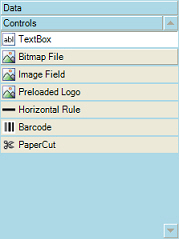 This area of the Receipt Editor window displays other elements that you can place on a Point of Sale form, including the following controls:
-
Text Box - Print a literal text string or an expression (i.e., a formula or other function) that is bound to data.
-
Bitmap File - Prints a bitmap (.bmp) image from a file.
-
Image Field - Prints an image in the database, typically a signature obtained via a signature capture device.
-
Preloaded Logo - Prints the header or footer logo that is loaded into a receipt printer's memory.
-
Horizontal Rule - Prints a horizontal line (i.e., a series of dashes).
-
Barcode - Prints a barcode in Code 39 format, bound to a field in the database (e.g., DocumentID or CustomerID).
-
Paper Cut - Cuts the receipt paper.
 Image Field controls are streamed to your receipt printer during printing, which may cause performance issues.
If the Controls list is not visible, click the  button to expand it, collapsing the Data tree.
Just like data fields, you can drag a control from the Control list to an empty square on the Designer tab to add it to a Point of Sale form. You can also resize or reposition controls on the Designer tab.
Use the Control Properties area of the Receipt Editor window to define the settings for each control, such as the text to display in a text box or the image to print in an image field.