Radiant receipts:
Configuring store and station settings
To use the new Radiant receipt format, you must first enable the new device management framework for your store and register your workstations. You must also configure your receipt printers using the Device Management window (Setup > Point of Sale > Devices).
In addition, you must update the Form type setting on the Form Groups tab of the Stations window (Setup > Point of Sale > Stations) to specify that you are using Radiant receipts at each of your stations.
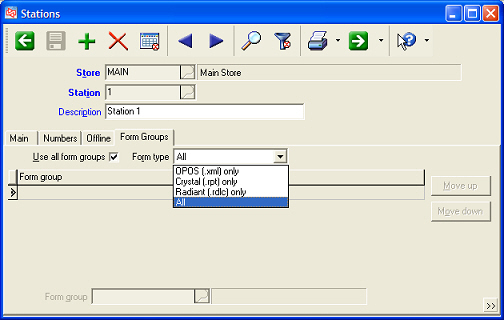
Select Radiant (.rdlc) only to restrict the station to printing Point of Sale forms in Radiant receipt (i.e., .rdlc) format.
Select the All option to allow the station to print Point of Sale forms in .rdlc, .xml, and .rpt formats. This setting is useful for stations for which you have configured a Crystal receipt printer for the purpose of printing 40-column reports (e.g., the X-Tape and Z-Tape reports).