Radiant reciepts: Receipt Editor
Sections list
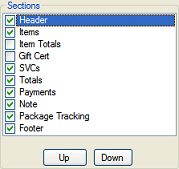 This area of the Receipt Editor window displays the sections that are included on the receipt or Point of Sale form you are working with, along with a check box for each one.
Sections are pre-defined groups of fields, expressions, and other controls that allow you to easily include common information on a receipt or other Point of Sale form. Think of them as the basic building blocks of the Receipt Editor.
Counterpoint's standard receipts and Point of Sale forms already include the appropriate sections.
To include a section on a custom receipt, select the corresponding check box. You can modify the elements in the section or add new elements using the Designer tab.
To remove a section from a custom Point of Sale form, simply clear the corresponding check box.