Defining e-mail system settings
Before you can send receipts, reports, or customer statements via e-mail, you must define a valid SMTP host name for your e-mail system or provider, along with other e-mail settings, using the NCR Counterpoint Management Console.
Follow these steps to configure SMTP settings for your company:
-
Start the NCR Counterpoint Management Console (Start > Programs > Counterpoint > Utilities > Management Console), select your Hub server from the Object Explorer, and then click the
 Mail tab.
 -
Enter the SMTP host name for your e-mail system or provider (e.g., smtp.myemailprovider.com) in the SMTP Server Host field.
-
Specify the SMTP port you are using in the Port Number field.
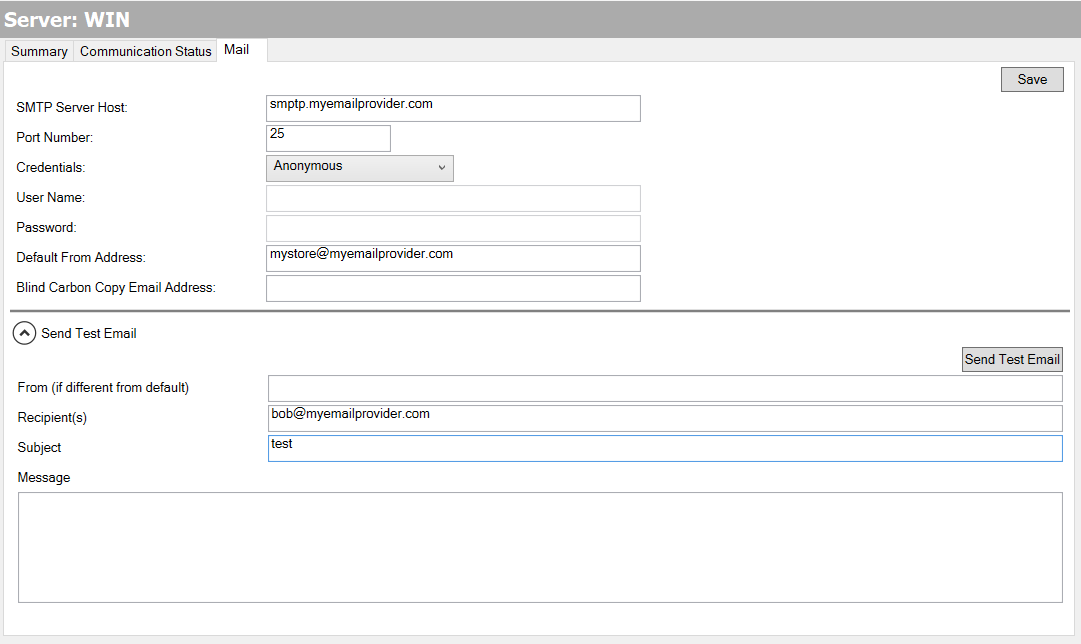
 The default SMTP port is 25.
-
If you are required to log in to your e-mail server, select one of the following options from the Credentials list box:
-
Default Credentials - With this option, Counterpoint will log in to your e-mail server with the current user's user name and password when the user attempts to send a receipt, report, or statement via e-mail.
-
User Credentials - This option allows you to specify the User Name and Password that Counterpoint will use to log in to your e-mail sever when a user attempts to send a receipt, report, or statement via e-mail.
-
If your e-mail system uses the Secure Sockets Layer transport protocol, select the Use SSL? check box.
Counterpoint V8.5.7 and newer versions, now use the SSL transport protocol by default. The Use SSL? check box has been removed.
-
Enter the Default From Address (e.g., mycompany@myemailprovider.com) for your company.
-
Click the Save button to save your SMTP host name and other e-mail settings.
If you wish, you may send a test message to verify that your e-mail settings are correct.
To do so, expand the Send Test Email section of the Mail tab, specify the Recipient(s) for the message (separating each address with a semicolon), enter a Subject and Message, and then click the Send Test Email button.
If the test message is unsuccessful, double-check your SMTP host name and other e-mail settings, and then send another test message.