Authorizing users to send reports via e-mail
Follow these steps to authorize users to send reports (including purchase orders) via e-mail:
-
Select Setup > System > Security Codes to display the System Security Codes window.
-
Enter or look up the security code that is assigned to the user(s) you want to authorize to send reports via e-mail.
-
Click the Authorizations tab.
-
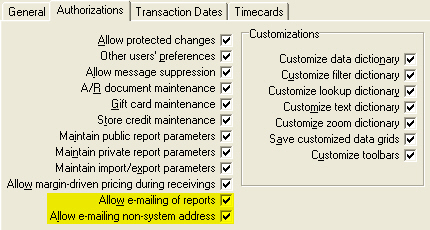
Select the Allow e-mailing of reports check box.
-
Select the Allow e-mailing non-system address check box if you want to allow users to send reports to e-mail addresses that are not associated with user, customer, or vendor records in Counterpoint.
This setting allows a user to specify a "one use" e-mail address when sending a report.
-
Save your changes.
 Repeat steps 2 through 5 for each system security code you want to authorized to send reports via e-mail.