Receipt Editor: Section Properties
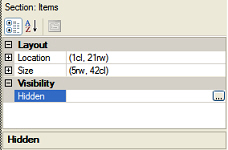 This area of the Receipt Editor window displays the properties for the active section of the receipt or Point of Sale form, including the Layout and Visibility settings.
You can modify the Location (i.e., the Left and Top position) and the Size (i.e., the Height and Width) of a section by editing the corresponding fields directly.
You can make the Visibility of a section conditional by clicking the  button next to the Hidden field and defining a conditional expression. Counterpoint will evaluate this expression to determine whether the section is hidden when the form is printed.
The number of columns (i.e., PageColumns) on the form is specified when the form is created and cannot be changed.