Using Counterpoint in offline mode
Counterpoint Services Status window
Select the Status command from the Counterpoint Services Status utility menu, to display the  Counterpoint Services Status window, which includes the following fields and buttons:
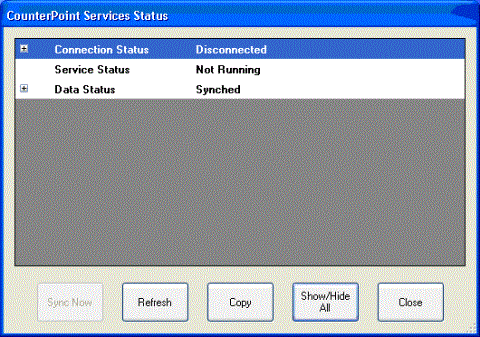
Connection Status
This field indicates whether the offline workstation has connected to the server within the past 120 seconds.
Last Connection Time
This field indicates the date and time of the workstation’s last successful connection to the server.
 All times displayed in this window are based on the offline workstation’s clock.
Host Status
This field indicates whether the server is available on your network.
Port Status
This field indicates whether the designated CPServices port is available on the server. If the Port Status is Unavailable, your firewall may not be configured to allow the necessary CPServices traffic.
Host
This field indicates the hostname or IP address of your server.
Service Status
This field indicates whether CPServices is running on the offline workstation. If the Service Status is Not Running, CPServices should be restarted.
Data Status
This field indicates whether all offline data (i.e., tickets and new customer records) have been extracted from the workstation’s local database and uploaded to the server:
-
Synched indicates that all offline data have been extracted and uploaded.
-
Pending Extraction indicates that the offline database includes offline data that have not been extracted for upload to the server.
-
Pending Upload indicates that all offline data has been extracted from the offline database, but one or more offline data packages (each of which contains up to 10 tickets) are waiting to be uploaded to the server.
When the workstation is connected, the Rad Sync service extracts offline data from the local database every 15 minutes and uploads offline data packages to the server every 60 seconds.
Last Upload Time
This field indicates when the last successful upload of offline data to the server occurred.
Last Download Time
This field indicates when the last successful download of configuration data from the server occurred.
Packages Queued
This field indicates the number of offline data packages—each of which includes up to ten tickets—that have been extracted from the offline database, but have not been uploaded to the server.
Tickets Awaiting Extraction
This field indicates the number of tickets in the offline database that have not been extracted for upload to the server.
Sync Now
Click this button to immediately extract all tickets and other offline data from the offline workstation for upload to the server, and then download and apply any updated configuration data from the server.
The Sync Now button is available only when the offline database is not synchronized with the server (i.e., tickets or other offline data are waiting to be extracted and uploaded).
Refresh
Click this button to update the Counterpoint Services Status window with current information for your workstation.